
Every Case File.
One Workspace.
TaxVero's document management software centralizes every file your organization collects, with secure client upload, in-portal preview, and required document tracking that keeps nothing falling through the cracks.
A Centralized Document System, Built Into The Case
TaxVero's Document Management is a centralized tax document management system built for tax resolution firms, CPA practices, and tax law offices. It handles secure client document upload through the Client Portal, in-portal preview of any file format without download, required document tracking with automated missing-file alerts, and a full historical record of every document action across the case lifecycle.
Every file is organized by client and case, connected to the worksheets and forms it supports, replacing the email attachments, shared drives, and unsecured file transfers that traditional tax practice document management depends on.
- Secure client upload through the Client Portal
- In-portal preview of any file format without download
- Required document tracking with missing-file alerts
- Full historical record of every document action
Document Chaos Is The Hidden Friction In Every Tax Case
Every resolution case lives or dies on supporting documentation. Most firms still run document workflows that haven't changed in a decade.
Email Attachments Don't Scale
Clients email a bank statement here, a pay stub there, a real estate appraisal three days later, and nobody knows what's actually been collected.
Shared Drives Get Confusing
There's no required-document checklist, no upload tracking, no record of who accessed what, no connection to the worksheet the document supports.
Missing Documents Stall Cases
When documents go missing, the case stops. When the business doesn't realize something's missing until the IRS asks, the case stops harder.
One Centralized Workspace. Every File Connected.
Map
Required document list generated automatically on case open.
- Resolution cases · OIC cases · Preparation engagements
- List configured by case type · more complex cases require more
Collect
Client uploads directly through the secure Client Portal.
- Any format · PDF · Images · Spreadsheets · Scanned documents
- Every upload encrypted in transit and at rest
Preview
Every file viewable inline without downloading.
- PDFs · Images · Spreadsheets · Scanned documents
- Downloads available when needed
Connect
Documents linked to the worksheet sections they support.
- Bank statement → Financial information worksheet
- Asset appraisal → Equity calculation section
Track
Every document action captured in the case history.
- Uploads · Views · Modifications
- Timestamped · attributed to the team member who acted
- Prior versions retained alongside active versions
Document Collection That Actually Works.
The client-facing side of document management runs through the Client Portal, with the same workflow consistency the rest of the platform uses.
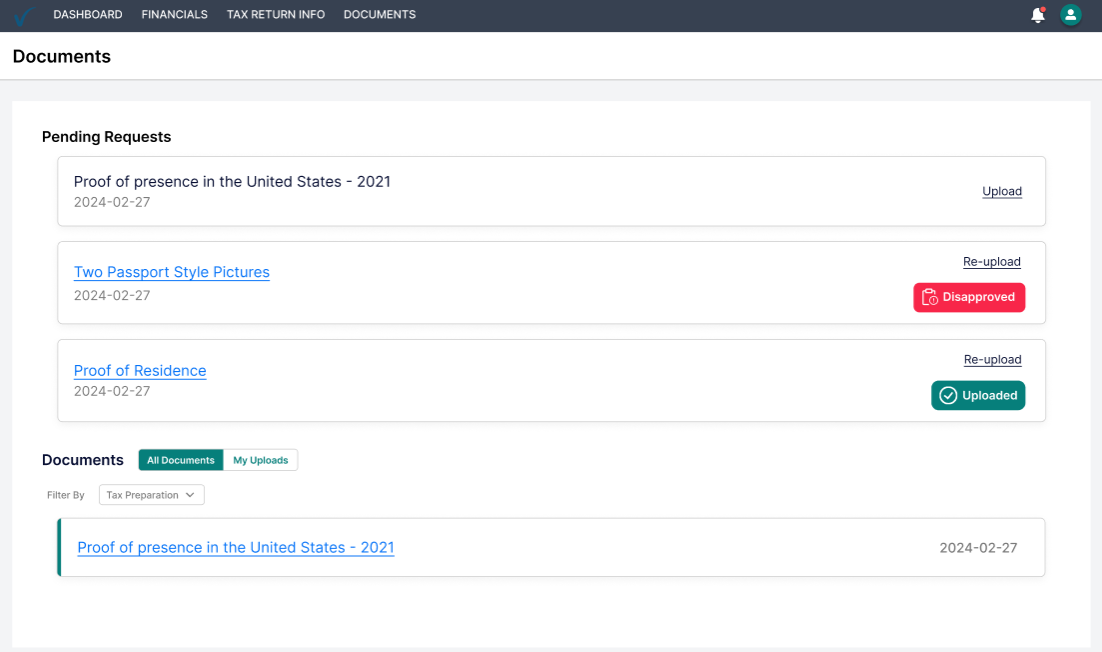
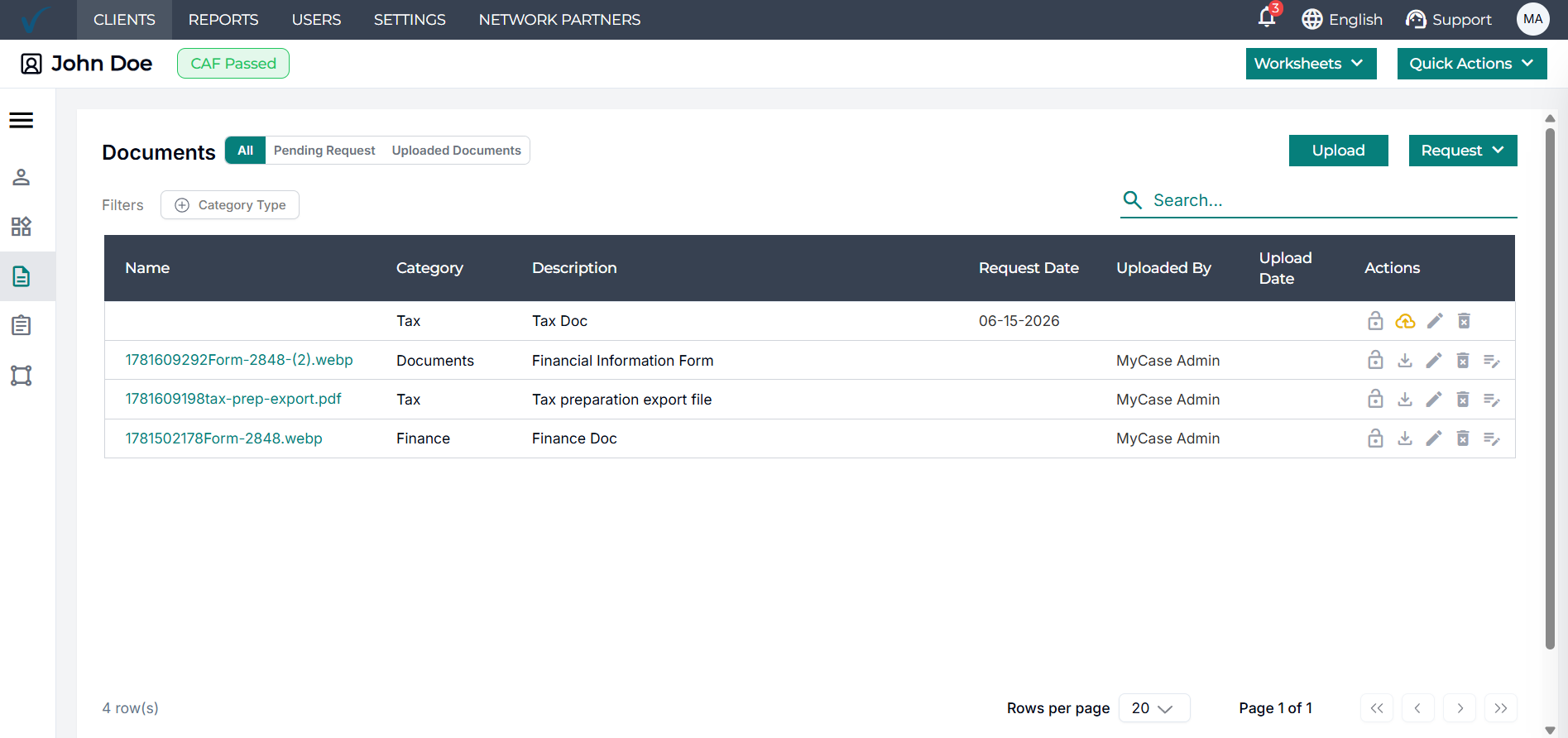
Multi-Format Upload
Any format the client has: PDF, JPG, PNG, scanned document, mobile photo, spreadsheet - uploads to the same case workspace. Clients don't need to convert files; the platform handles it.
Status Tracking
Clients see which documents are still required, which are uploaded, and which the team has reviewed. The status is visible to both sides; the back-and-forth disappears.
Missing Document Alerts
If a required document is missing past a configured deadline, the system alerts both the client and the firm. Nothing sits forgotten in an inbox.
Role-Based Access
Team members see the documents relevant to the cases they work on. Partners see across the firm. Clients see only their own. Access is configured at the case level, so the right people see the right files, and the boundaries hold without manual management.
Connected Document Management vs The Folder Sprawl
Everything You Need to Know About TaxVero's Document Management
TaxVero's tax document management software is a centralized case document system for tax resolution firms, CPA practices, and tax law offices. It handles secure client document upload through the Client Portal, in-portal preview of any file format, required document tracking with automated missing-file alerts, and a full historical record of every document action. Files stay organized by case and connected to the worksheets and IRS forms they support.
Clients access the secure Client Portal and upload required documents directly. The portal shows them exactly which documents are needed by section. Any format uploads to the same case workspace. Every upload is encrypted in transit and at rest. No email attachment workflow, no insecure file transfer.
Yes. Files are encrypted at rest and in transit. Access is role-based; team members see documents relevant to their cases, partners see across the firm, and clients see only their own. Every document upload and modification is captured in a time-stamped history. The platform is built for the document chain-of-custody requirements that tax resolution work demands.
Yes. TaxVero supports universal in-portal preview, PDFs, Word documents, spreadsheets, images, and scanned documents, all preview inline within the case workspace. Your team can review files without downloading them, keeping client financial information off individual devices by default. Downloads are available when needed.
When a case opens, TaxVero generates the required document list based on the case type. The list is visible to both the organization and the client through the portal. If required documents remain missing past a configured deadline, the system alerts both sides automatically. Cases don't stall because something was forgotten in an inbox.
Uploaded documents stay linked to the worksheet sections they support. A bank statement uploaded for the financial information worksheet remains linked to that section; an asset appraisal supporting the equity calculation stays attached to the relevant worksheet section. The substantiation trail from raw document to worksheet entry is preserved structurally, not reconstructed manually.
For tax practice document management specifically, yes. A shared folder structure is storage; it doesn't track required documents, doesn't alert on missing files, doesn't link documents to the worksheets they support, and doesn't preserve a chain of custody. TaxVero is a document management system built into the case, with the security and structure that tax resolution work requires.
Yes. The Client Portal upload is mobile-friendly. Clients can capture pay stubs, expense receipts, and other documents from their phone and upload directly into the case workspace, useful for documents the client has on hand but not on a computer.
Documents are retained according to the firm's configured retention policy. Every retention or deletion event is logged in the document history. Firms running multi-year resolution cases can configure retention accordingly.
Stop Chasing Documents. Start Running Cases.
TaxVero's document management software centralizes every case file in a secure workspace, with required-document tracking, in-portal preview, and a full historical record connecting every document to the worksheet or form it supports.
Book Your Demo